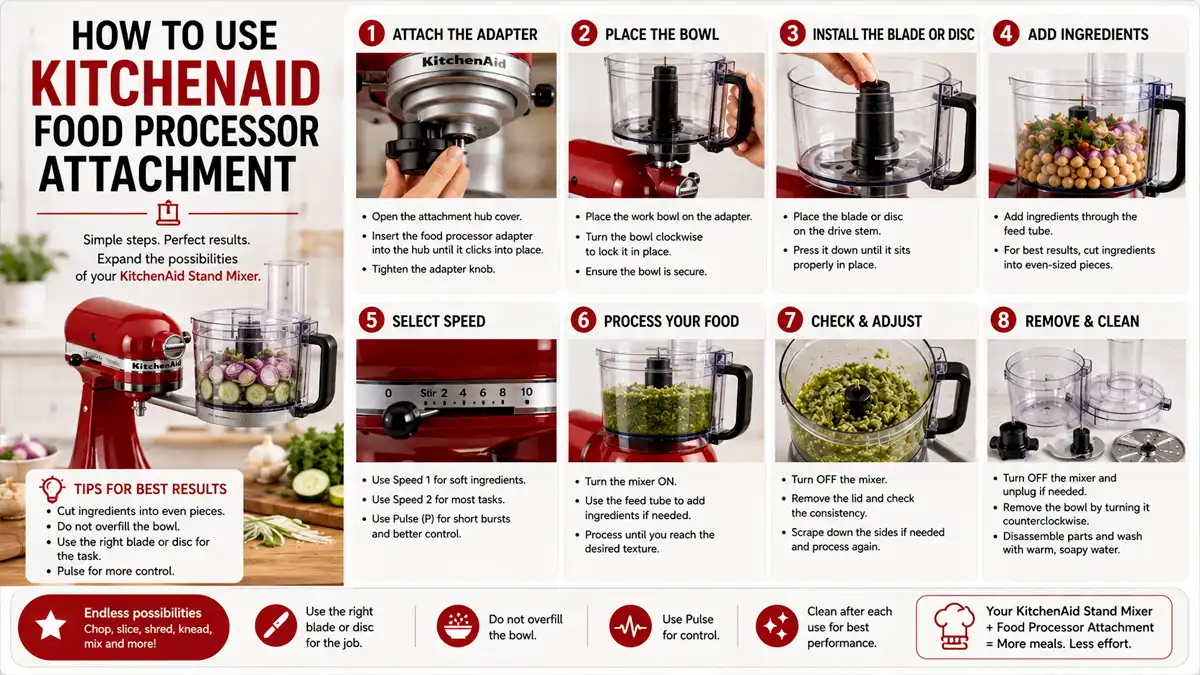
How To Use Kitchenaid Food Processor Attachment
How to use a KitchenAid food processor attachment can turn frustrating jobs like chopping onions or shredding cheese into 30- to 60-second tasks. The exact setup depends on your model, including the bowl, chute, feed tube, and pusher design. Once you identify the correct parts, the process is straightforward: install the bowl and blade or disc, align the drive, lock the lid, and process in short batches.
Use the feed tube and pusher for uniform pieces. Stop to scrape the bowl or clear the chute when food builds up. For most chopping and shredding, pulsing or running the processor briefly gives you better control than letting it run continuously.
Key Takeaways
- Check model compatibility. Confirm that the attachment fits your specific KitchenAid food processor model before assembly.
- Lock the lid fully. The processor should not run if the work bowl or lid is not properly seated and locked.
- Start with clean parts. Wash and dry the bowl, lid, and blades to reduce slipping and uneven cutting.
- Feed consistently. Use the feed tube and pusher to keep pieces the same size and prevent jams.
- Clear clogs early. Stop, unplug, and remove stuck food before continuing.
Gather the Right KitchenAid Attachment Parts
Correct assembly prevents wobbling, leaking, uneven cuts, and jams. KitchenAid food processor attachments typically include a work bowl and lid, plus a blade or disc that mounts to the drive. Some kits also use adapter parts or a separate spindle.
Before plugging anything in, gather the pieces for your specific attachment:
- Work bowl
- Lid
- Feed tube and pusher, if included
- Blade or disc
- Adapter parts, if your kit uses them
Clear your counter, keep a spatula nearby for scraping, and have a small towel ready for drying. If you are switching between attachments, do one dry assembly with the unit unplugged. This lets you confirm how the parts fit before you add food.
How the Attachment Works
The attachment uses two systems: the drive transfers power, and the blade or disc cuts the food. The cutting piece must sit correctly so it spins freely and stays centered in the bowl. Food must also enter the feed tube in a way that lets the blade or disc cut it evenly.
Continuous processing creates finer blends, but soft ingredients such as tomatoes, ripe bananas, or cooked potatoes can quickly turn past the texture you want.
Stopping occasionally is part of normal use. Food can climb the sides of the bowl or collect near the chute even when the attachment is assembled correctly. Stop and check the mixture before the processor begins straining.
Step-by-Step KitchenAid Food Processor Attachment Setup
- Unplug the base. Disconnect power before assembling the attachment or changing blades and discs.
- Set the work bowl in place. Align the bowl with the base and rotate or seat it until it locks.
- Install the blade or disc. Place the cutting piece onto the drive, using the adapter or spindle included with your attachment kit.
- Check that the blade spins freely. With the unit unplugged, rotate the blade by hand to make sure it does not scrape the bowl.
- Add ingredients and lock the lid. Load the food, close the lid, and confirm that the locking tabs click fully into place.
- Use the feed tube and pusher. Insert food into the chute and press it down with the pusher. Do not use utensils to push food from the top.
- Pulse or run briefly. Start with short pulses for chopping, then process in small increments until the texture looks right.
- Stop to scrape and clear. If food climbs the sides or collects in the chute, stop, unplug, and scrape or remove the stuck food.
- Remove and clean the parts. Detach the attachment carefully and wash it before residue dries.
When shredding cheese, feed it evenly through the tube and use brief runs. Check the texture before continuing. If shreds start to clump, stop and scrape the bowl walls so the attachment can cut instead of rubbing against the buildup.
For chopped onions, use pulse mode rather than a long continuous run. Pulsing keeps the onions from turning into puree and helps prevent onion rings from riding up the chute. If larger pieces remain, redistribute the contents with a spatula and pulse again.

Helpful pick
COFUN 5-in-1 Food Processor Attachment for KitchenAid Stand Mixer
This 5-in-1 multifunctional attachment provides all the necessary components to get your food processor set up and running on your stand mixer.
Techniques for Even Chopping, Slicing, and Shredding
Uniform input produces more uniform output. Cut or break large ingredients into pieces that fit the feed chute, then pack them loosely so the pusher can move them without stalling the drive.
Learn when to stop. For chopped textures, stop early and check. For shredding and slicing, stop when the pieces begin to shorten significantly because the remaining scraps often produce irregular shapes. Frequent checks reduce waste and help you learn the timing that suits your attachment and preferred texture.
Batch size also affects results. An overloaded work bowl reduces cutting efficiency because food circulates around the blade path instead of repeatedly entering it. Use smaller batches when needed, and scrape the sides if food begins building up in one area.

Helpful pick
HOZODO Food Processor Attachment for KitchenAid Stand Mixer, 5-in-1
Achieve uniform chopping and slicing with this versatile 5-in-1 attachment, designed to help you process ingredients with precision and ease.
Use these texture guidelines:
- Coarse chop: Pulse, scrape, and pulse again.
- Fine chop: Use longer pulses or slightly longer runs, then scrape the bowl.
- Shred or slice: Feed steadily, run briefly, and clear the chute promptly.
What works in practice
Dense ingredients such as firm carrots or hard cheese need smaller batches and a consistent feed rate. This helps prevent the attachment from bogging down.
Keep cutting surfaces clean and dry. Oil or leftover residue can cause sliding, smearing, or uneven thickness on some discs. Wash parts after use, and confirm that blades and discs are fully seated before locking the lid.
Do not add grease unless your model’s manual specifically calls for it. Handle blades by the center hub or designated edges, and keep your fingers away from cutting surfaces. The lid and pusher are safety parts designed to keep your hand out of the chute.
Choosing the Right Mode for Common Tasks
| Task | Best Mode | Feed Style | What to Watch For |
|---|---|---|---|
| Chopping onions | Pulse | Even batches, redistribute if needed | Onion rings turning to paste |
| Minced garlic | Pulse | Small pieces, short bursts | Burning or over-processing |
| Shredding cheese | Brief runs + steady feed | Use pusher, keep pressure even | Clumping or rubbing instead of cutting |
| Slicing cucumbers | Brief runs + consistent feed | Feed straight through tube | Uneven slices from drifting pieces |
| Making crumbs | Pulse, then check | Toss chunks evenly | Turning to dough if overmixed |

Helpful pick
GVODE 5-in-1 Food Processor Attachment for KitchenAid Stand Mixers, Dicer
Handle dense ingredients like hard cheeses and carrots effectively with this high-quality dicing attachment designed for consistent, reliable food processing.
Mistakes That Cause Jams and Uneven Results
Every KitchenAid attachment does not assemble the same way. Blades, discs, and adapters vary by model year and attachment type. A close fit can still create wobble or poor cutting performance. If a blade or disc does not seat easily, stop and re-check the alignment instead of forcing it.
Overloading the bowl creates another common problem. Too much food can jam against the lid opening or circle around the blade without being cut efficiently. Increased noise, slower processing, and unexpectedly large pieces are signs that the batch may be too large.
Never use utensils to push food down the chute. Use the included pusher. A spoon or spatula can enter the spinning blade path and disrupt the steady feed needed for uniform slicing and shredding.
Also avoid these mistakes:
- Do not ignore buildup. Stop, unplug, clear the food, and continue.
- Do not mix ingredient sizes randomly. Large and small pieces produce uneven results.
- Do not use the wrong blade or disc. A chopping blade is not a slicing disc, and a slicing disc is not a shredding disc.
Techniques for Cleaner, More Consistent Processing
For shredding and slicing, consistent feeding matters more than speed. Keep pieces straight and press with steady, gentle force. Too much pressure can compress soft foods, causing them to smear, or overload the chute and create a jam. Too little pressure can produce partial slices or incomplete shredding.
Chill doughy or sticky ingredients before processing. Cold ingredients cut more cleanly and are less likely to smear around the disc. If residue clings to the sides, stop and scrape it away instead of forcing more food through the buildup.
Wash parts between tasks when switching attachments. Dried onion or cheese residue can affect the next texture and make assembly feel sticky or slightly misaligned.
Quick Troubleshooting
- Uneven cuts: Stop, verify that the blade or disc is seated correctly, and reduce the batch size.
- Food not feeding: Cut pieces smaller, feed them straight, and clear the chute.
- Frequent clogs: Pulse more often, scrape more frequently, and avoid overpacking.
- Lid will not lock: Remove ingredients from the rim area and make sure the bowl is seated correctly.
- Food is too fine or pureed: Use shorter pulses and stop sooner.
FAQ
How do I know which KitchenAid food processor attachment I have?
Look for model-specific identifiers on the attachment body and compare them with your food processor base model. If you have the box or manual, check the parts list for the attachment type, such as a blade, shredder disc, slicer disc, or adapter set. When uncertain, dry-fit the attachment with the unit unplugged and confirm that it sits flat and spins freely.
What safety steps should I follow before using the attachment?
Unplug the base before installing or removing blades and discs. Lock the work bowl and lid fully before processing, and use only the included pusher in the feed tube. If food jams, stop processing, unplug the unit, and clear the chute with a spatula or by carefully removing the attachment.
How long should I run the food processor for best results?
For shredding or slicing, run the processor briefly and check the results often. Scrape the bowl when buildup appears.
Why is my attachment jamming?
Check that the lid is locked, reduce the batch size, and feed ingredients consistently through the chute. If food climbs the sides, stop, scrape the bowl, and continue with smaller batches.
What is the most common mistake people make with food processor attachments?
Many people push ingredients down the chute with utensils instead of using the pusher. That creates a safety risk and disrupts the steady feed. Use the pusher and check the texture while processing.
Final Take
The KitchenAid food processor attachment is a versatile addition to your stand mixer that makes slicing, shredding, and dicing faster and more consistent. Once you assemble it correctly and choose the right disc for your task, you’ll wonder how you managed without it.