Cuisinart Pro Custom 11 How To Use
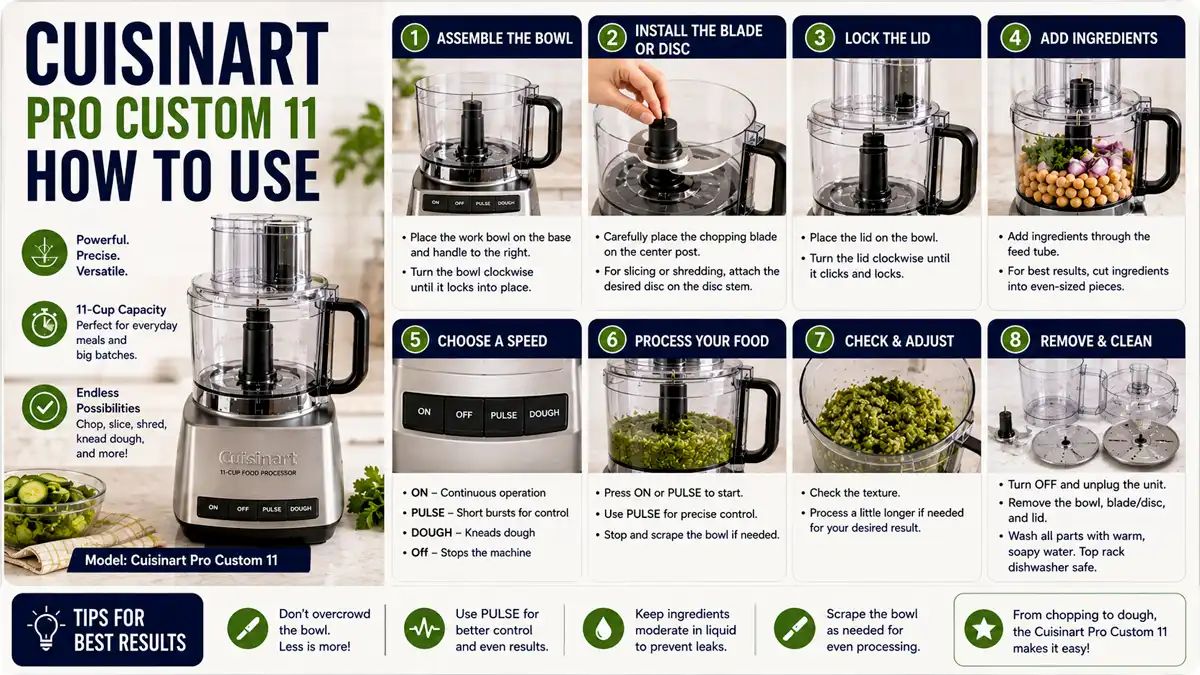
If you bought a Cuisinart Pro Custom 11, the fastest route to better chopping, slicing, shredding, and pureeing is simple: install the right tool, lock the bowl and lid, then process in short, controlled runs. This Cuisinart Pro Custom 11 how to use guide covers the basics you need to get started. Start with pulse for most chopping tasks, scrape the bowl once midway, and stop before food turns mushy. Always unplug the machine before reaching into the bowl or handling a blade or disc.
Cuisinart Pro Custom 11 Quick Start
- Check the parts. Confirm that you have the 11 cup work bowl, matching lid, pusher/feed tube, and the blade or disc required for the task.
- Lock everything in place. The bowl and lid must be fully seated and secured before the processor will run.
- Use pulse for control. Short bursts help you chop and mince without turning food into paste.
- Feed steadily. Use the feed tube at a consistent pace for even slices and shreds.
- Scrape and adjust. Stop when ingredients cling to the bowl or process unevenly, scrape the sides, and continue.
- Clean promptly. Rinse removable parts immediately so food does not dry onto the bowl, lid, blade, or discs.
Set Up the Cuisinart Pro Custom 11
Check the parts before plugging in the processor. You need the 11 cup work bowl, the correct lid, the pusher/feed tube, and the cutting tool suited to your recipe. If a part is missing or the lid does not match the bowl, the processor may not lock correctly and the food may process unevenly.
Place the unit on a stable countertop with enough room to add ingredients and remove the bowl. Keep a spatula nearby for scraping, and prepare ingredients before starting. Cut large pieces small enough to fit the feed chute, measure liquids for sauces or purees, and keep your hands away from the blade path.
The processor works best when your workflow is ready before the motor starts. Have a bowl available for processed ingredients if you need to separate batches or textures.
💡 Ensure your kitchen is fully equipped with this versatile 11-cup processor, which includes all the essential components for your daily food preparation needs. Cuisinart Food Processor, Dishwasher Safe 11-Cup Food Processor with Slicing & Shredding Discs, Cuisinart Pro Custom 11 Stainless Steel Electric Chopper & Kitchen Food Processor, Chrome, DLC-8SBCYP1.
Match the Tool to the Task
The multipurpose metal blade handles chopping, mixing, and pureeing. Slicing and shredding discs produce more consistent cuts. Use the tool that matches the result you want rather than trying to make one attachment do every job.
Chopping and mincing usually work best with pulse and short runs. Slicing and shredding depend on steady feeding through the tube. Purees and dough-like mixtures may need longer processing, but stop to check the texture instead of running the processor automatically.
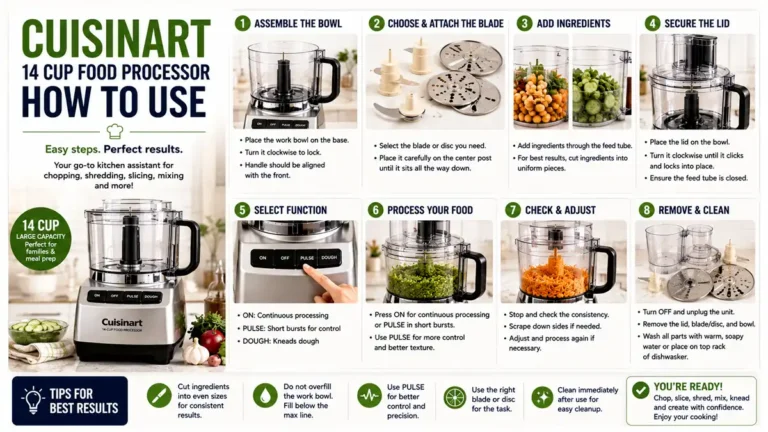
Step-by-Step Cuisinart Pro Custom 11 Instructions
- Choose the tool. Use the multipurpose blade for chopping and blending, or a slicing/shredding disc for consistent cuts.
- Install the bowl and blade or disc. Seat the work bowl on the base, then install the cutting tool according to the way it locks into place.
- Prepare the ingredients. Cut large pieces into manageable sizes, especially fruit and vegetables going through the feed tube.
- Lock the lid. Place the lid on the bowl, make sure it locks, and insert the feed pusher correctly for tube-based processing.
- Start with pulse. Use short bursts for chopping and mincing, or run at a suitable speed for the tool and ingredient.
- Scrape and finish. Stop when needed, scrape the bowl with a spatula, and continue until the texture matches your goal.
- Unplug before changing tools. Once processing is complete, unplug the unit before removing a blade or disc for cleaning or swapping.
Chopping an Onion
Cut the onion into chunks and add them to the bowl. Pulse in 2 to 5 second bursts until the pieces look evenly chopped. Scrape the bowl once, then pulse again if necessary. Continuous processing can turn onion from chopped pieces into watery paste faster than expected.
Slicing Tomatoes or Cucumbers
Install the slicing disc and pack the feed tube with evenly sized pieces. Feed them steadily rather than forcing them through. Pushing too aggressively can produce uneven slices or a jam. Underfeeding can leave gaps and create a thicker slice at the leading edge.
Making a Dip or Hummus
Process solid ingredients such as chickpeas first, using a short blend to break them down. Add liquids gradually, stop to scrape the bowl, and blend again until smooth. Scraping prevents food from clinging to the bowl wall and leaving a chunky layer above a smoother mixture.

Helpful pick
Cuisinart FP-110AG Core Custom 10-Cup Multifunctional Food Processor, Anchor Gray
This multifunctional processor offers an intuitive design that makes installing your work bowl and cutting tools simple for every step of your recipe.
Techniques for Better Texture
Pulse timing gives you the most control over texture. It helps you stop at chopped rather than pureed, which is useful for onions, herbs, toppings, salsa, and crust mixtures. If large pieces remain beside smaller ones, pulse a little longer and scrape the bowl once midway through the process.
Prepare ingredients in consistent sizes. This matters especially when using slicing or shredding discs. A carrot piece twice the diameter of the others will meet the disc differently and can produce uneven thickness even when the disc is installed correctly.
Add liquids gradually for sauces, batters, and purees. Pouring everything in at once can make the mixture whirl before the solids are fully broken down, leaving a looser texture than the recipe calls for.
A food processor can emulsify quickly, but it can also overmix. For dough-like mixtures and thick batters, shorter runs may produce better structure than one long blend.
What works in practice
Choose the speed and timing together. Use pulse or lower or medium settings for controlled chopping, and use a higher speed only when the tool and ingredient require it. If food clogs the feed tube, slow down and use smaller batches before changing blades.
Avoid overfilling the bowl. Packed ingredients cannot move freely, so the blade chops unevenly and discs may bind. Leave room for food to circulate and for the pusher to guide ingredients smoothly.
Keep the countertop organized. A spatula, measuring cup, and empty bowl within reach make it easier to scrape, add liquids, and separate batches without improvising while the processor is running.
Clean the processor immediately after use. Dried residue is harder to remove from blades, discs, and the bowl. Remove the parts promptly, rinse them carefully, and keep your fingers away from cutting edges.
Tool-to-Task Reference
| Task | Best Tool | Best Action |
|---|---|---|
| Chopping onions, herbs | Multipurpose blade | Pulse, scrape once |
| Making salsa | Multipurpose blade | Pulse in short bursts |
| Shredding cheese | Shredding disc | Feed steadily, avoid overpacking |
| Slicing cucumbers | Slicing disc | Use even sizes, steady feed |
| Smooth puree or hummus | Multipurpose blade | Blend, scrape, add liquid gradually |
Prevent Uneven Chopping, Jams, and Overprocessing
Overfilling creates a common problem. When ingredients cannot move toward the blade, the processor may work the top layer while food underneath sits untouched. Divide the ingredients into smaller batches instead of packing the bowl.
Avoid forcing ingredients through the feed tube. Push at a steady pace to reduce clogs and uneven slices. If the tube is blocked, stop the processor and unplug it before clearing the obstruction.
Never change a blade or remove a disc while the unit is plugged in. Unplug the processor every time you handle a cutting part, even after the motor has stopped.

Helpful pick
Cuisinart Food Processor, 14-Cup Vegetable Food Chopper for Mincing, Dicing, Shredding, Puree & Kneading Dough, 720-Watt Motor, Stainless Steel, DFP-14BCNY
Avoid the common issue of overfilling your bowl by upgrading to this larger 14-cup capacity processor, which provides extra room for processing bigger batches.
Practical Tips for Repeatable Results
Use a texture checkpoint rather than processing until the mixture simply “looks done.” Run the machine for a short interval, check the texture, and continue in small increments. This approach helps prevent mushy onions, garlic, and cooked ingredients.
When appropriate, pre-chill ingredients so they hold their shape better during processing. This can help with butter-based mixtures and certain vegetables when you want chopped pieces rather than a paste.
Wet ingredients can behave differently from dry ones when shredded. Very wet vegetables may clump, while drier vegetables often shred more cleanly. If clogs keep occurring, pat the ingredients dry, cut them slightly smaller, or process a smaller batch.
For aioli and thick dips, add liquid slowly and scrape the bowl at least once. Gradual liquid additions help the mixture become smooth instead of lumpy or separated.
Write down timings that work for your recipes. Ingredient moisture and batch size change the result, so a note such as “Pulse 3 times, scrape, then pulse 2 more times” is more useful than guessing each time.

Helpful pick
Cuisinart FP-110SS Core Custom 10-Cup Multifunctional Food Processor, Silver Sand
Achieve repeatable, professional results in your kitchen with this efficient food processor, perfect for checking textures during small processing intervals for perfect consistency.
FAQ
How do I assemble the Cuisinart Pro Custom 11 before first use?
Start with the base unplugged. Install the work bowl, add the correct blade or disc, and attach the lid. Make sure the lid locks before turning on the unit. If a part does not seat smoothly, stop and check the alignment rather than forcing it.
What speed setting should I use for chopping and mincing?
Use pulse for most chopping and mincing, especially with onions, herbs, and garlic. Short bursts give you better control over texture.
Why is food clogging the feed tube or slicing unevenly?
Overpacking and pushing too quickly usually cause clogs. Cut ingredients into consistent sizes, feed them at a steady pace, and use smaller batches when necessary.
How long can I run the processor continuously?
For everyday prep, short runs with pulsing and occasional pauses usually produce better texture than long continuous processing. Stop if the food begins heating up, smearing, or passing the texture you want.
What should I do if the processor will not start when I press power?
Check that the bowl and lid are fully seated and locked. Confirm that the correct blade or disc is installed properly and that the unit is on a stable countertop. If it still will not start, unplug it and re-check the assembly before trying again.
Final Take
The Cuisinart Pro Custom 11 is built to last with professional-quality results year after year. Start with a simple task, practice the technique, and you’ll master this versatile kitchen powerhouse in no time.